CIFS
Create Share User
Right click My Computer
Click Manage
Select Local Users and Groups
Double click users
Click Action->New User
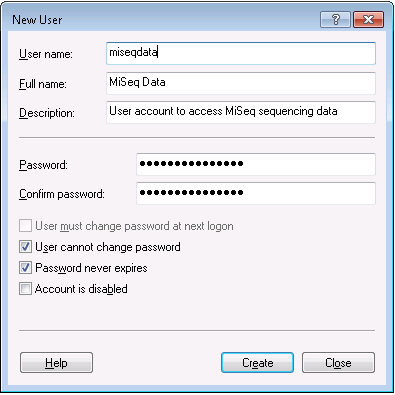
- Fill in the form as follows
- User name: miseqdata
- Full Name: MiSeq Data
- Description: User account to access MiSeq sequencing data
- Password: <complex password of your choice>
- Unselect user must change password
- Select User cannot change password
- Select Password never expires
- The form should look like this when filled out
- Click Create
Create Share
Open My Computer
Open the Data(D:) drive
Open the Illumina folder
Right Click the MiSeqOutput folder
Click Properties
Click Sharing Tab
Click Advanced Sharing
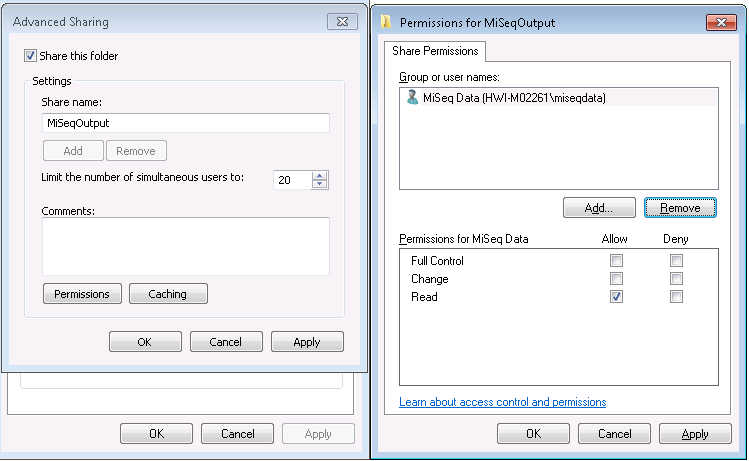
Check ‘Share this folder’
Leave Share Name as is
Click permissions
Click add
Type in miseqdata and press ok
Select Everyone
Click Remove
- Ensure everything is set like this
Click OK in the Permissions window
Click in the Advanced Sharing window to create the share
Ensure the MiSeq firewall allows access to the shares
Start
Control Panel
Network and Sharing Center
Click Windows Firewall in the bottom left of the screen
Clcik Advanced settings in the left pane
Click Inbound Rules
- Create a new firewall rule
Click Action in the top menu
Click New Rule...
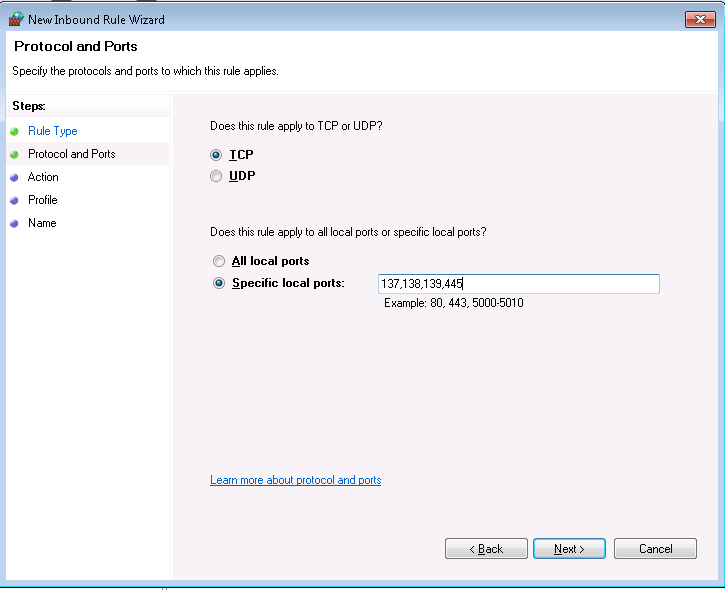
Click Port
Click Next
- Fill out the form as follows
Click Next
Allow the connection
Click Next
Check Domain, Private and Public
Click Next
The name should be SMB TCP
Click Finish
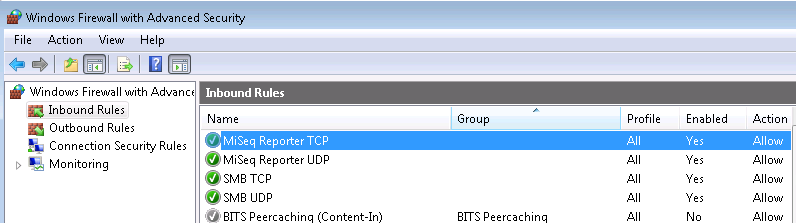
Repeat the steps to create a new rule except in step 5 select UDP instead of TCP and name the rule SMB UDP
- When you are finished you should have two rules that show up as follows
Mount CIFS in Linux
Instructions on how to mount a windows share read-only that mounts on startup. If you are unsure if a share is already mounted you can use the <pre>mount</pre> command to list all mounted filesystems
Become super user
su -
Ensure you have cifs-utils installed
yum install -y cifs-utils
Create mount point
mkdir -p /path/to/mountpoint
chmod 755 /path/to/mountpoint
Create credentials file
cat <<EOF > /etc/credentials.share001
username=share_username
password=password_for_username
EOF
chmod 600 /etc/credentials.share001
Create fstab entry
cat <<EOF >> /etc/fstab
//<windows_ip_address>/<sharename> /path/to/mountpoint  cifs    ro,credentials=/etc/credentials.share001
EOF
Mount the drive
mount -a